Total Recorder Editor Free Full Version
Free Audio Recorder And Editor
Record your voice or PC sound, clean up a recording, and save the audio you want to keep.
- Record Microphone And PC Sound
- Cut, Trim And Join Audio
- Clean Up Voice Recordings
- Save MP3, WAV Or FLAC
- No Purchase Or Registration
100% Free to UseAll Features IncludedNo Payment. No Registration.
Version 8.1.0 · 44.38 MB · Windows 11 & 10, 64-bit
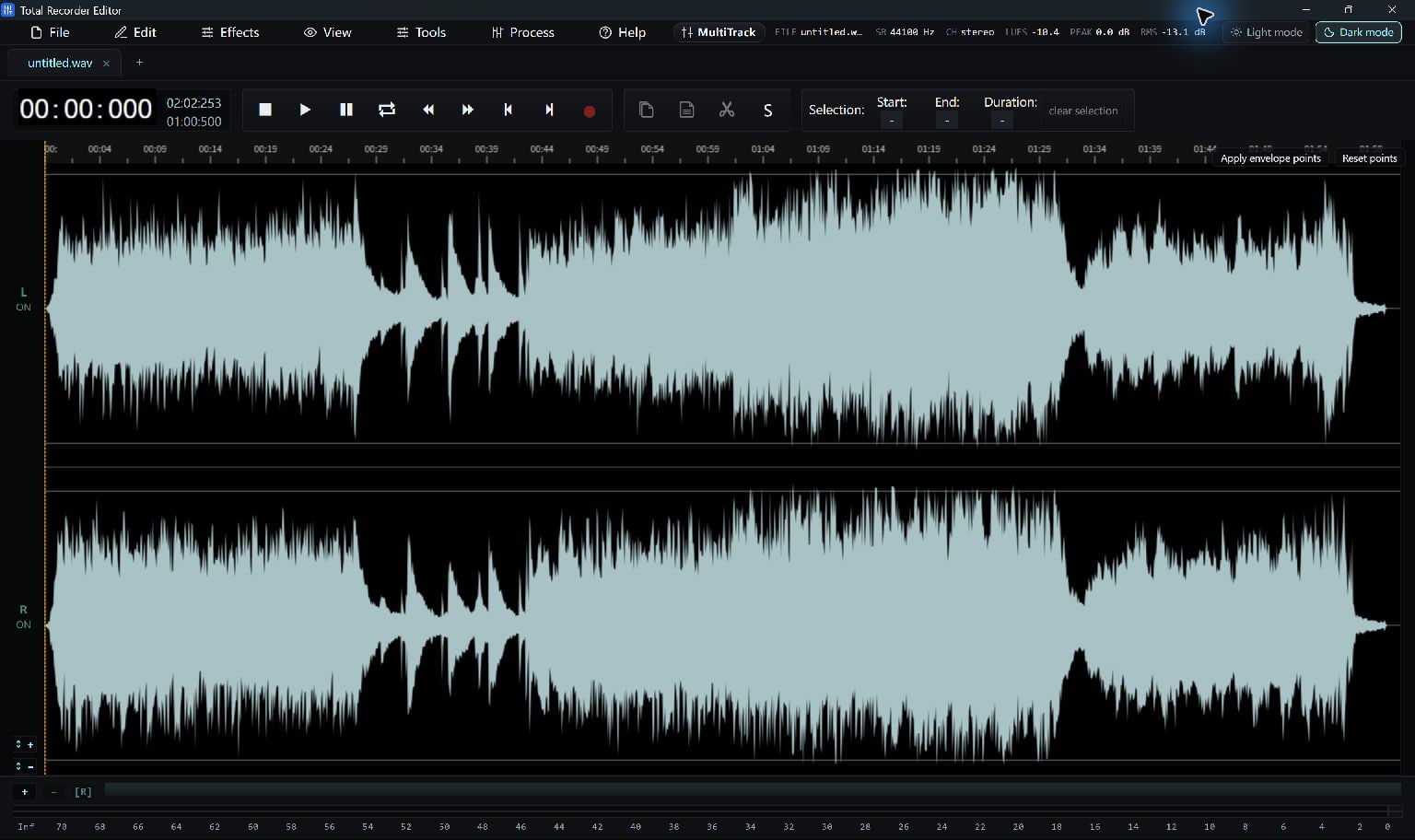
Make Something Worth Keeping
Easy From The First File
Step 1. Record Or Open
Capture sound or open an audio file.
Step 2. Shape Your Audio
Trim the waveform and adjust the sound.
Step 3. Save Your Result
Choose an audio format and save a copy.
Built Around Your Task
A Free App That Gets It Done
Capture The Sound You Need
Record your microphone, system playback, or both with a live level meter.
Keep The Best Parts
Cut, copy, paste and trim on the waveform, then use undo and redo while you refine the edit.
Make Voices Easier To Hear
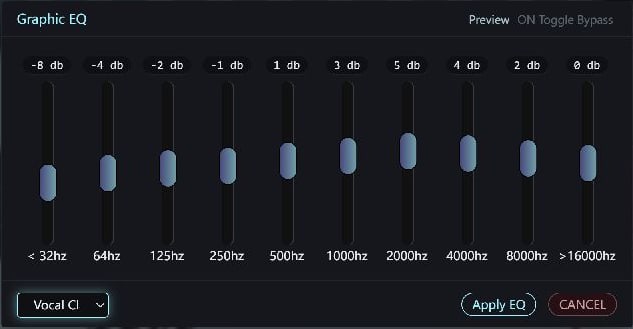
Use noise reduction, EQ, volume, fades and loudness tools to improve a recording.
Save A Useful Audio File
Export MP3, WAV, FLAC, M4A, OGG and other supported audio formats. This Total edition enables supported audio exports free.
Take Sound From Video
Open a supported video to edit its soundtrack. Additional media components may be prepared when first needed.
Return To Your Work
Save an editable project and use recent files, automatic backups and recovery to continue later.
A Format For Your Next Step
Work With The Files You Already Have
Choose a supported output for your player, project or next edit.
Total Recorder Editor
System Requirements & File Details
Windows 10 version 2004 (build 19041), or Windows 11 · x64.
Included; a separate .NET installation is not required. Microsoft Edge WebView2 Runtime is required. If missing, Setup opens the official Microsoft download page with consent; install it and run Setup again.
Download/install prerequisites if missing. Online imports, module updates and first-use media tools require internet. Ordinary local audio editing does not require Deno downloads.
SHA-256
95976f199c9f7dd904424c0a9236c08168cc2e4bc29bcf281e237c34d728fe92
100% Free to UseAll Features IncludedNo Payment. No Registration.
Digitally Signed Windows Setup
View All Free DownloadsGet More From Your Software
A Little Help To Get Started
How To Record Audio On Windows
Record your microphone, computer sound or both with Total Recorder Editor, then trim and save the recording.
Read The GuideHow To Edit Music And Audio
Open an audio file, select parts of its waveform, trim or rearrange them, and save a finished copy with Total Recorder Editor.
Read The GuideHow To Batch Convert Audio Files
Use Total Recorder Editor's Batch Convert tool to choose files, select an audio format and save converted copies in an output folder.
Read The GuideHow To Edit MP3 ID3 Tags
Use the ID3 tag editor to set compatible MP3 track information, then check the exported copy in your player.
Read The GuideHow To Apply Audio Effects
Use selection, preview and comparison to apply EQ, fades, noise reduction and other audio effects with Total Recorder Editor.
Read The GuideHow To Join Audio Files
Insert clips in order or use a conversion queue to join supported audio files into a finished recording.
Read The GuideA Few Helpful Answers
Questions, Answered
Is Total Recorder Editor free?
Yes. This Total edition enables its supported audio export formats without purchase or registration.
Can it record computer sound and my microphone?
Yes. It supports microphone and system-playback recording, including a combined recording with a live level meter.
Can I edit MP3 and save it as WAV?
Yes. Open a supported MP3, edit it, then choose WAV when saving or exporting. The original file is not improved simply by converting it to a different format.
Can I reduce background noise?
The editor includes noise reduction, a noise gate, EQ and other voice-processing tools. Results depend on the recording, so preview the changes before saving.
Does it work on Windows 11?
It is designed for Windows 10 version 2004 or later and Windows 11 on 64-bit PCs. Microsoft Edge WebView2 Runtime is required; the .NET runtime is included.
Do I need internet to edit audio?
Routine local audio editing does not require online import tools. Internet access is needed for missing prerequisites, first-use media components, online imports and component updates.
What is different about Total Recorder Editor Pro?
The current Recorder Editor and Recorder Editor Pro downloads use the same free audio editor and provide the same supported editing and export capabilities.
Your Next Project Starts Here
Download the free Windows app and make something worth keeping.
Download Free100% Free to UseAll Features IncludedNo Payment. No Registration.
Windows 11 & 10 · 64-bit